
X XFediYour place in the Fediverse
XFEDI

Remote profile

ActivityPub
Profile banner
Posts

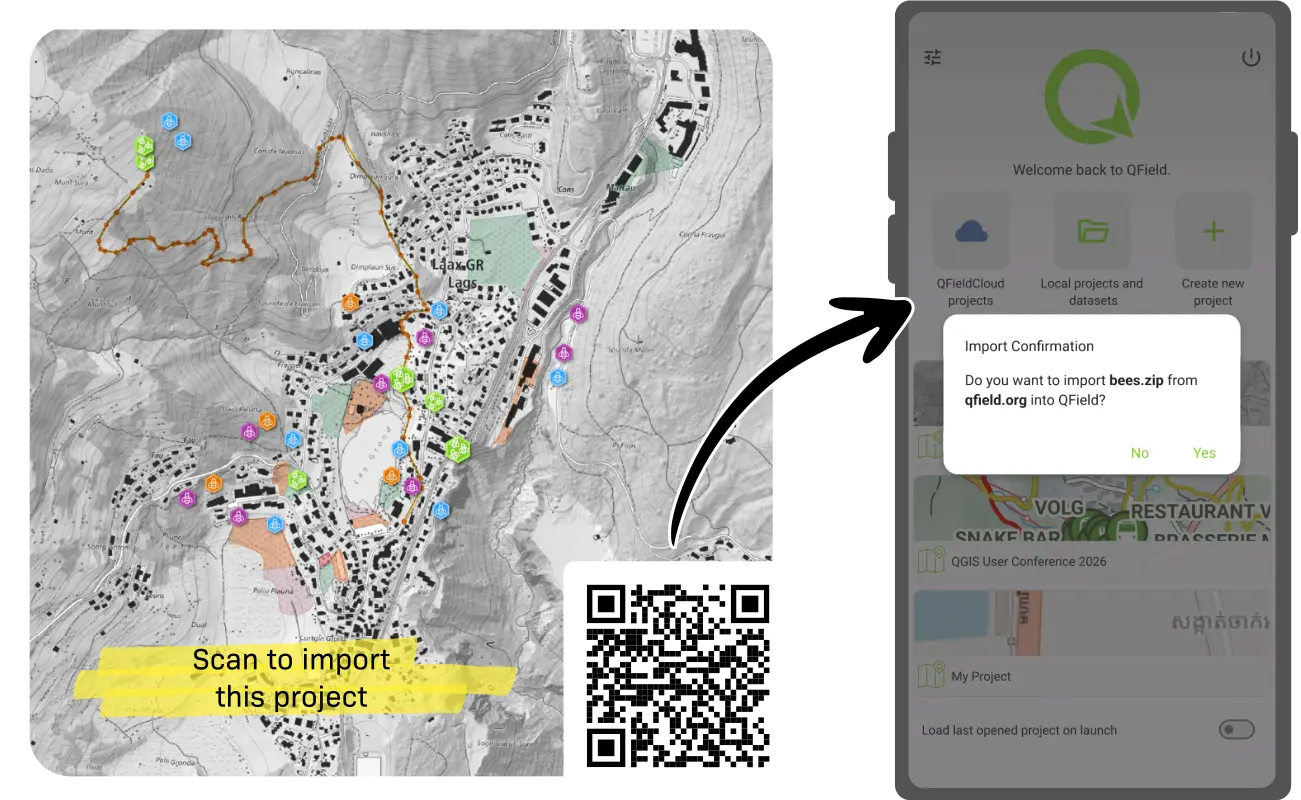
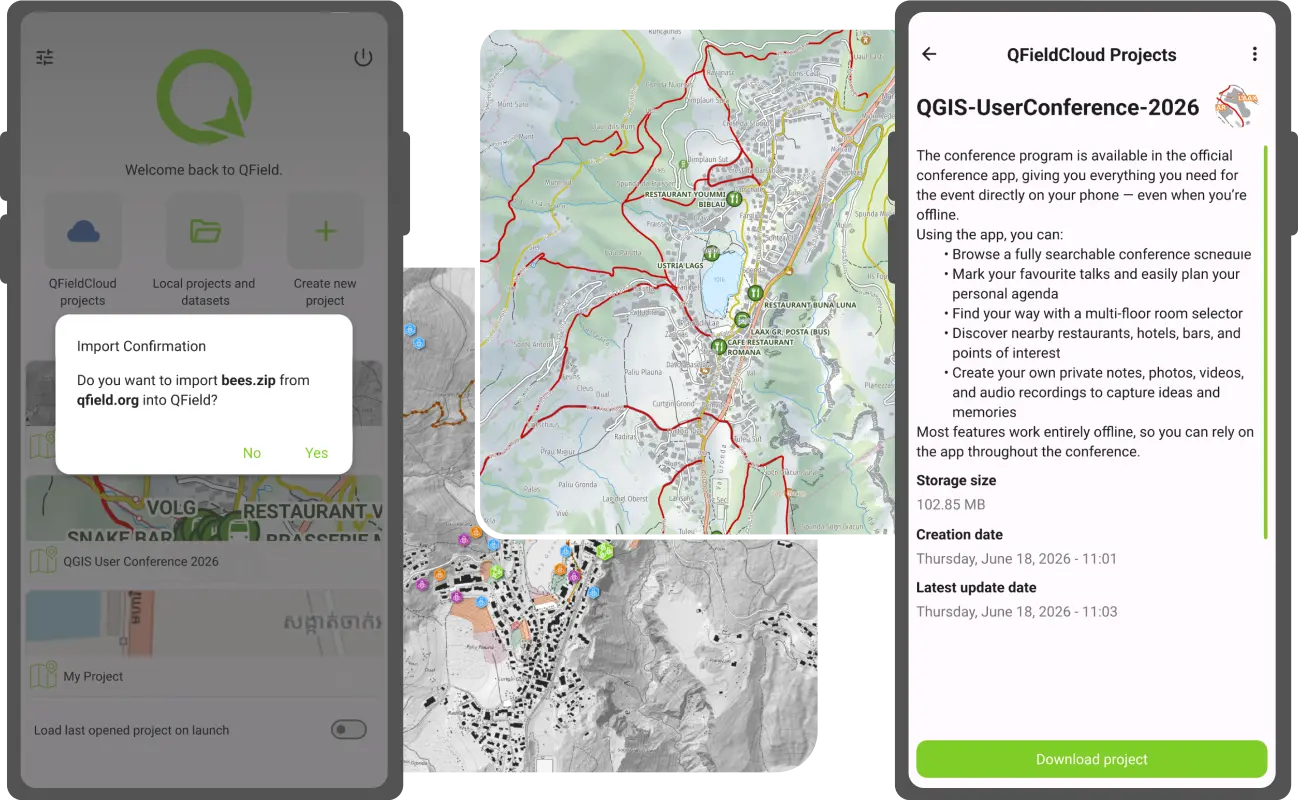
🗺️ Sharing maps in QField, tip 5/5: QR code to a map file

Hosting a zipped QGIS project or a georeferenced PDF online? Turn it into a QR code with this link:

qfield://local?import=YOUR_URL

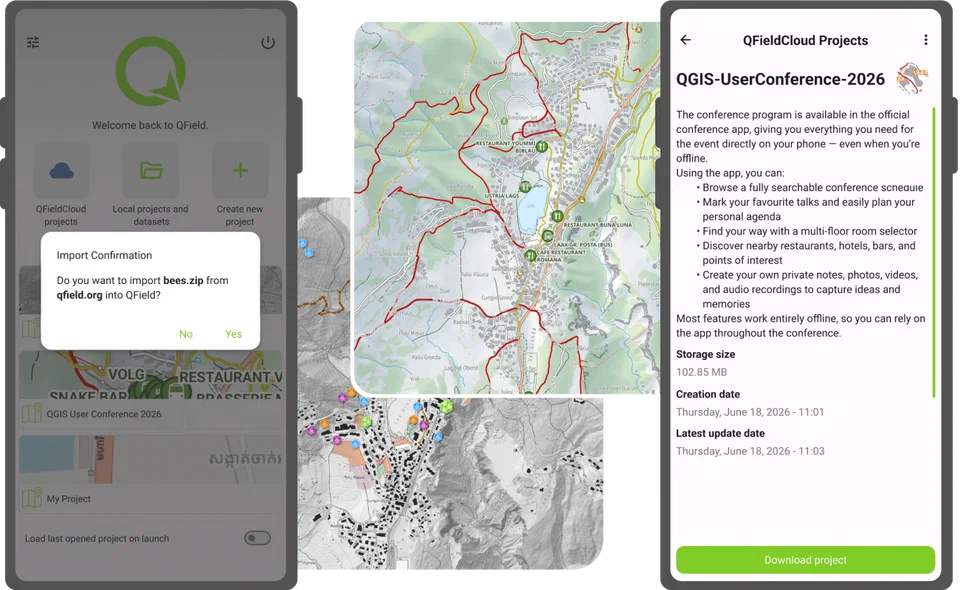
Scan it and QField shows the file name and the website it comes from, then imports it once you confirm. No typing long links on a phone keyboard.

That's the series! Which method do you use most?
https://qfield.org/blog/2026/06/18/the-many-ways-to-share-maps-with-friends-teammates-and-the-public-in-qfield/

#QField #QGIS #GIS

A QR code for importing a map file into QField, next to QField's import confirmation dialog
QField - Efficient field work built for QGISThe many ways to share maps with friends, teammates, and the public in QFieldOver the years, QField has gained a number of ways through which authors can share their mapping projects. This post looks at the multiple ways this can be achieved and what scenarios fit each method …
↩ Reply ♡ 0 · ↻ 0 ↗ Original

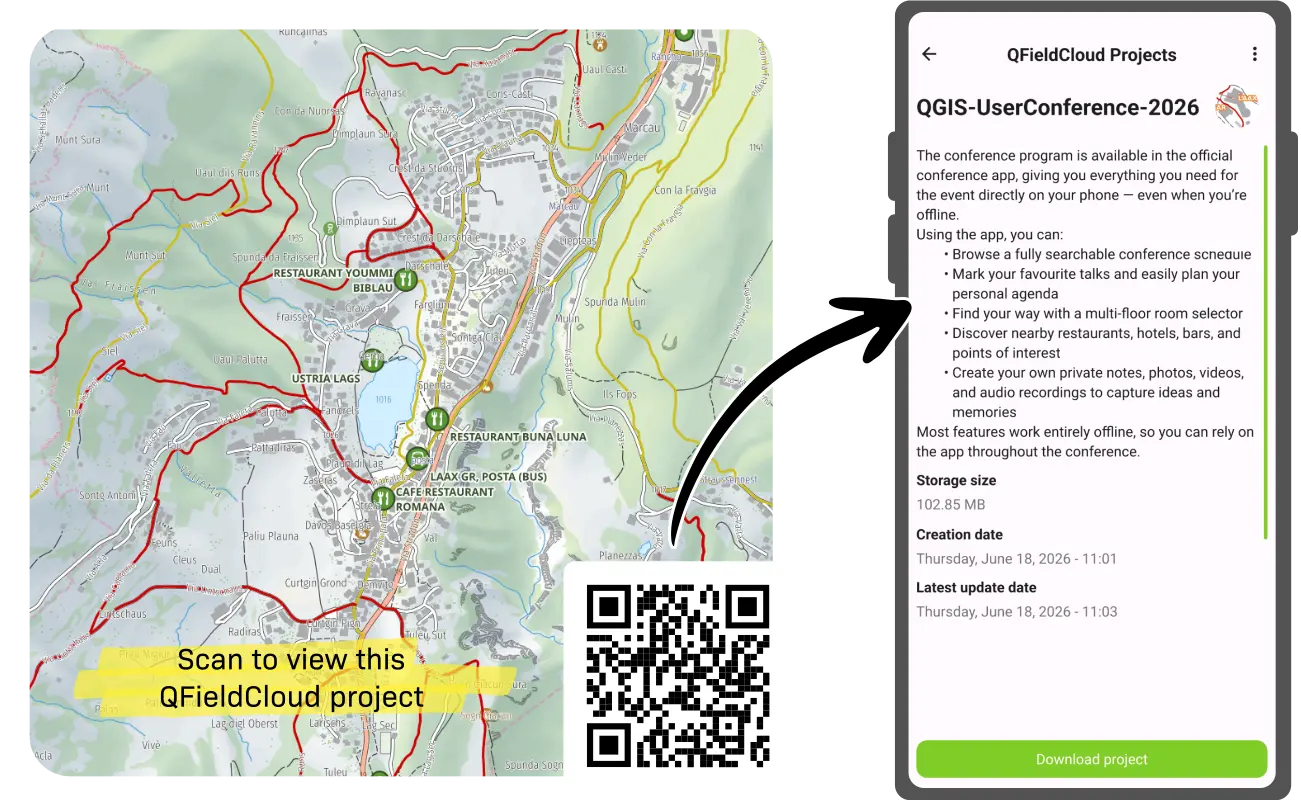
🗺️ Sharing maps in QField, tip 4/5: QR code to a cloud project

Skip the "search for this project" instructions. Use any QR generator with this link:

qfield://cloud?project=username/project_name

(swap in the owner's username or organisation and the project name)

Scan it with a phone camera and QField opens straight to that QFieldCloud project. Perfect for workshops, events and onboarding field teams.

https://qfield.org/blog/2026/06/18/the-many-ways-to-share-maps-with-friends-teammates-and-the-public-in-qfield/

#QField #QFieldCloud #GIS

A QR code that opens a QFieldCloud project in QField when scanned
QField - Efficient field work built for QGISThe many ways to share maps with friends, teammates, and the public in QFieldOver the years, QField has gained a number of ways through which authors can share their mapping projects. This post looks at the multiple ways this can be achieved and what scenarios fit each method …
↩ Reply ♡ 0 · ↻ 0 ↗ Original

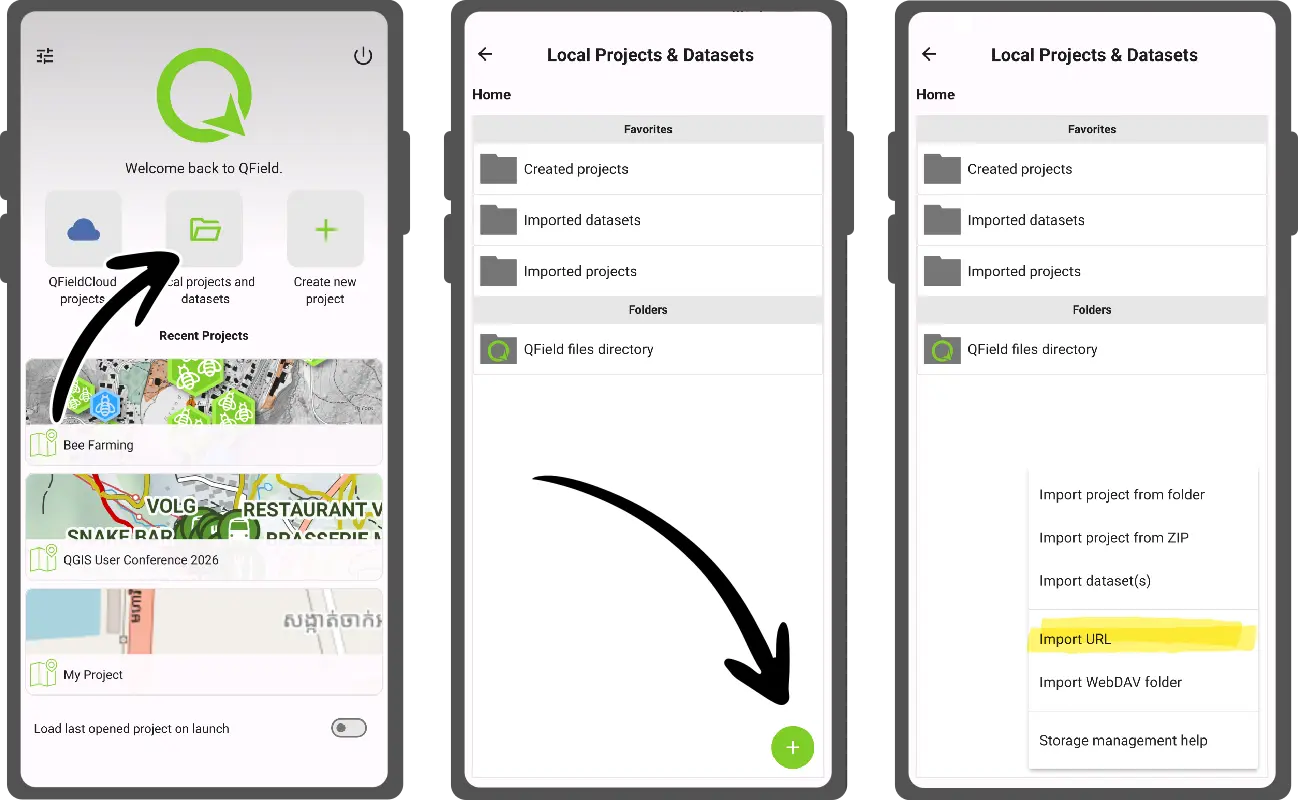
🗺️ Sharing maps in QField, tip 3/5: no cloud needed

You don't have to use QFieldCloud to share a map. Put a zipped QGIS project or a georeferenced PDF on any website, then in QField:

1️⃣ Open the local projects & datasets panel from the welcome screen
2️⃣ Tap the + button
3️⃣ Choose "Import from URL" and paste the link

Works on Android, iOS, Windows and Linux.

https://qfield.org/blog/2026/06/18/the-many-ways-to-share-maps-with-friends-teammates-and-the-public-in-qfield/

#QField #QGIS #GIS

QField screenshots showing the steps to import a map from a web URL
QField - Efficient field work built for QGISThe many ways to share maps with friends, teammates, and the public in QFieldOver the years, QField has gained a number of ways through which authors can share their mapping projects. This post looks at the multiple ways this can be achieved and what scenarios fit each method …
↩ Reply ♡ 0 · ↻ 0 ↗ Original

🗺️ Sharing maps in QField, tip 2/5: keep it in the team

Need private, collaborative mapping? Create the project under a QFieldCloud organisation.

Organisation members who are collaborators on the project see it automatically in their cloud project list in QField, and everyone's edits sync from the field as they go.

Ideal for teams and co-workers. Requires an organisation plan.

https://qfield.org/blog/2026/06/18/the-many-ways-to-share-maps-with-friends-teammates-and-the-public-in-qfield/

#QField #QFieldCloud #GIS

Media attachment
QField - Efficient field work built for QGISThe many ways to share maps with friends, teammates, and the public in QFieldOver the years, QField has gained a number of ways through which authors can share their mapping projects. This post looks at the multiple ways this can be achieved and what scenarios fit each method …
↩ Reply ♡ 0 · ↻ 0 ↗ Original

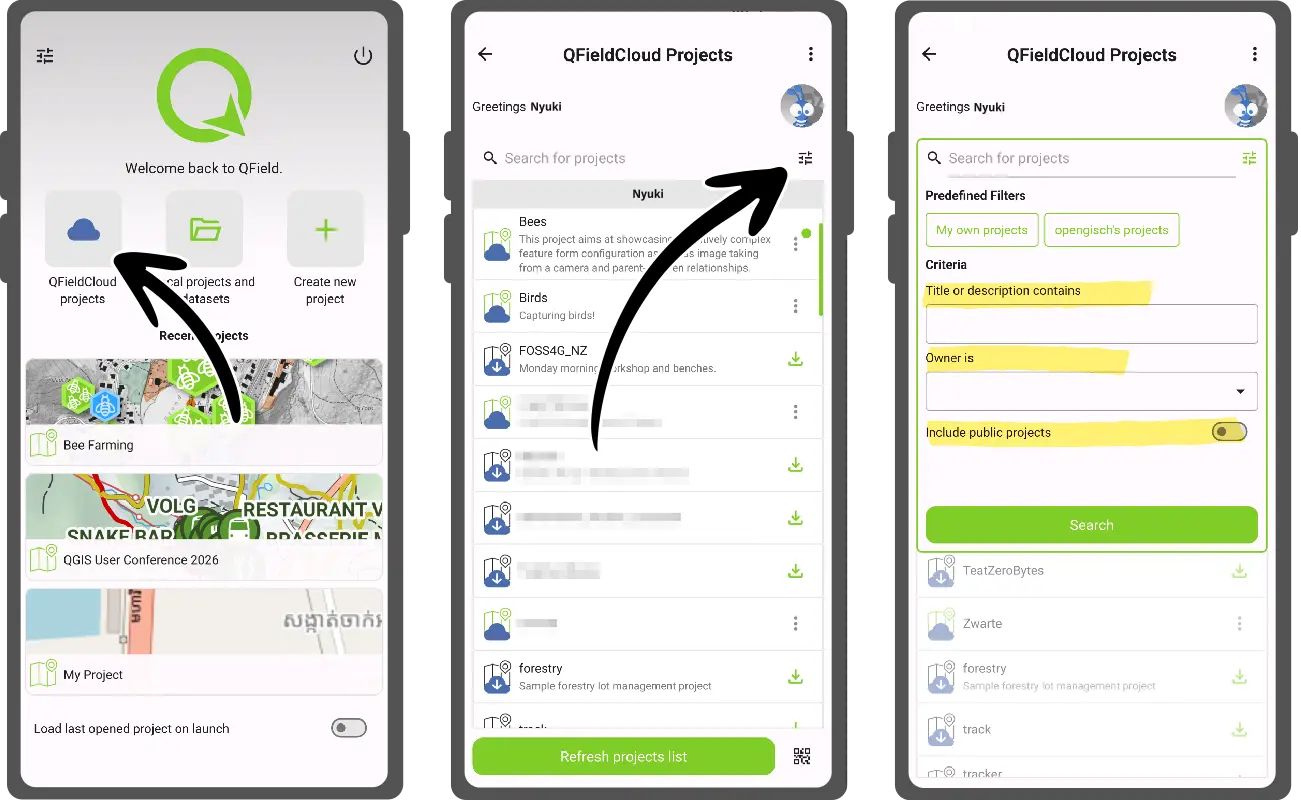
🗺️ Sharing maps in QField, tip 1/5: make it public

Want lots of people to use your map? Turn on the public option for your project in the QFieldCloud web interface or in QFieldSync.

Anyone with a QFieldCloud account (free accounts included) can then search for it by username and project name and open it in QField. They get read-only access, so your data stays untouched.

Perfect for wide audiences. Not for anything private.

https://qfield.org/blog/2026/06/18/the-many-ways-to-share-maps-with-friends-teammates-and-the-public-in-qfield/

#QField #QFieldCloud #GIS

QField screenshots showing the steps to share a map through a QFieldCloud project
QField - Efficient field work built for QGISThe many ways to share maps with friends, teammates, and the public in QFieldOver the years, QField has gained a number of ways through which authors can share their mapping projects. This post looks at the multiple ways this can be achieved and what scenarios fit each method …
↩ Reply ♡ 0 · ↻ 0 ↗ Original

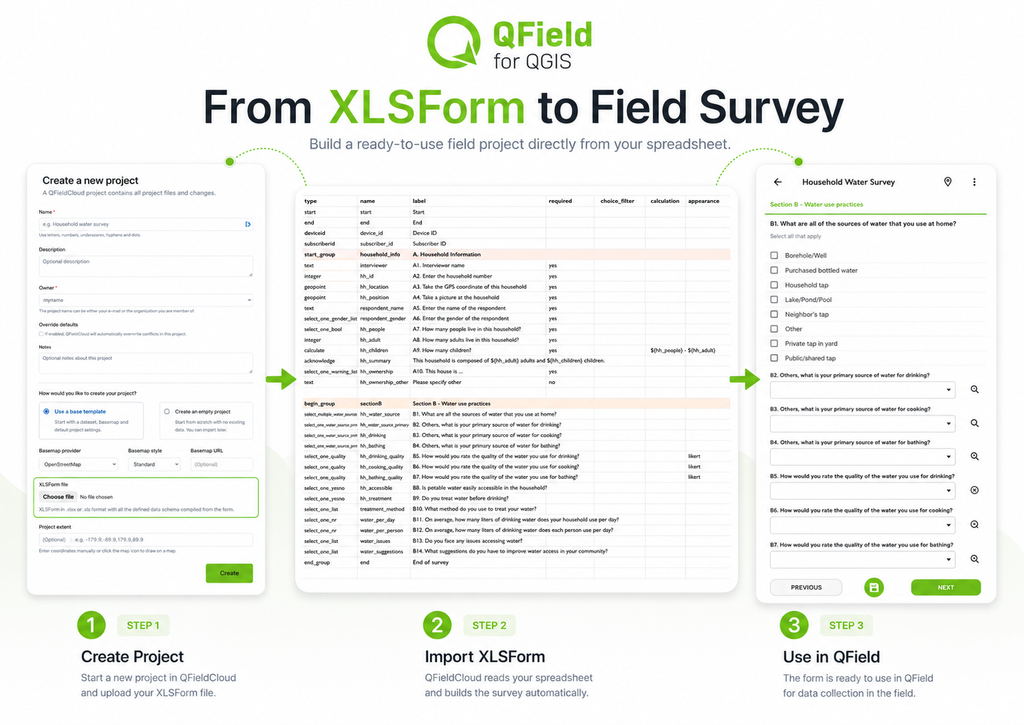
💡 QField tip: don't rebuild your survey from scratch

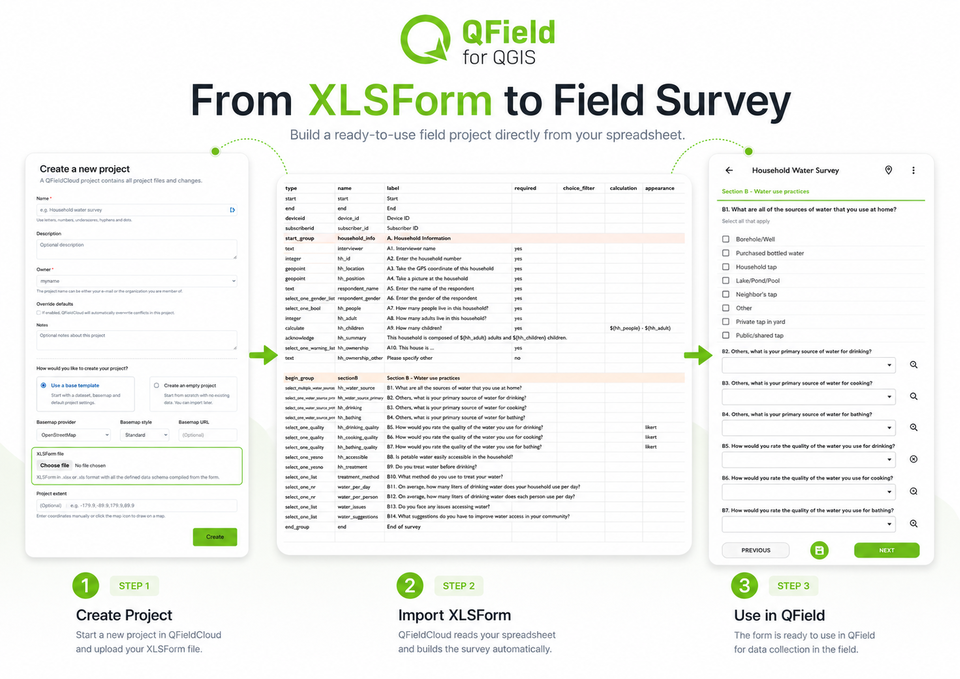
Already have your form as an XLSForm, the spreadsheet format behind tools like KoboToolbox and ODK? QFieldCloud can turn it straight into a field project:

1️⃣ Create Project
2️⃣ Choose the XLSForm option
3️⃣ Upload your spreadsheet

Questions, logic and constraints come across, ready for QField.

Running the same survey somewhere new? Pick "Clone an existing project" instead.

https://qfield.org/blog/2026/08/10/faster-project-creation-introducing-cloning-and-xlsform-imports-in-qfieldcloud/

Media attachment
QField - Efficient field work built for QGISFaster Project Creation: Introducing Cloning and XLSForm Imports in QFieldCloudQFieldCloud's project creation flow has been overhauled with a clean new web interface, native XLSForm imports, and 1-click project cloning to get your field data campaigns off the ground faster.
↩ Reply ♡ 0 · ↻ 0 ↗ Original

🚨 QField feature alert 🚨

Coming in the next QField release: a brand new digitizing layer bar!

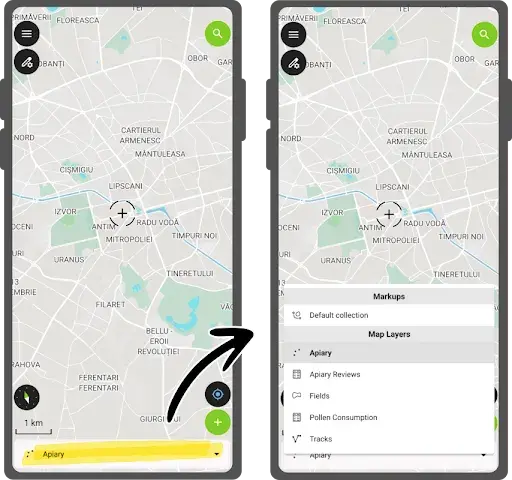
In digitizing mode, a bar at the bottom of the screen shows which layer your new features will be added to. Tap it to pick another layer. No more digging through a dense legend in the side dashboard.

The legend is here to stay, but this is a big step toward a friendlier QField for newcomers. We think it'll be a killer feature 🙂

Media attachment
↩ Reply ♡ 0 · ↻ 0 ↗ Original